> ## Documentation Index
> Fetch the complete documentation index at: https://docs.onefirewall.com/llms.txt
> Use this file to discover all available pages before exploring further.
# Check Point Integration Guide
## Overview
This guide explains how to integrate **OneFirewall Alliance (OFA) Threat Feeds** with **Check Point Security Gateways** using **Indicators** and **External Dynamic Lists (EDLs)**.
You can enforce threat intelligence feeds for the following categories:
* ✅ Malicious IPs
* ✅ Malicious Domains
* ✅ Malicious URLs
* ✅ Malicious File Hashes (MD5, SHA1, SHA256)
This integration enables real-time enforcement of security policies based on live threat data provided by OneFirewall Alliance.
***
## Supported Check Point Versions
OneFirewall threat feeds are compatible with Check Point gateways that support **SecureXL** and **EDL-based Indicators**.
| Version | SecureXL Support | Notes |
| --------------- | ---------------- | ---------------------------------------------------------------- |
| R75 and earlier | ❌ Not supported | SecureXL was unavailable or unstable in these versions. |
| R76 – R77.30 | ✅ Basic support | Early SecureXL features available, limited performance. |
| R80.10 – R80.30 | ✅ Full support | Stable with CLI tools and acceleration. |
| R80.40+ | ✅ Enhanced | Hardware acceleration improvements and better template handling. |
| R81 – R81.20 | ✅ Recommended | Most robust version with multithreaded SecureXL. |
| R82+ (future) | ✅ Ongoing | Continued optimization expected. |
***
## Prerequisites
* ✅ A valid **OneFirewall Alliance** account.
* ✅ Check Point Gateway running **R80.10 or later** (R81+ recommended).
* ✅ Ability to define **Indicators** in SmartConsole.
* ✅ Internet access from the gateway to reach OneFirewall's feed URLs.
* ✅ HTTPS inspection must allow outbound connections to threat feed URLs (if required by policy).
***
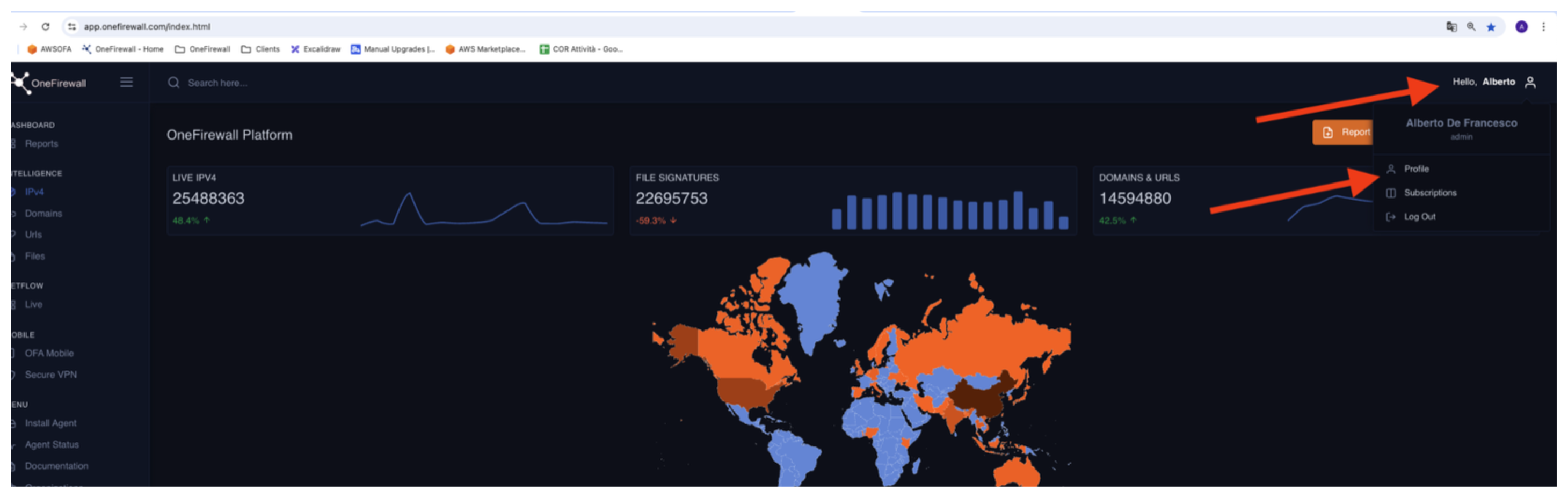
## Step 1: Generate API Token
1. Log into your **OneFirewall Alliance** dashboard.
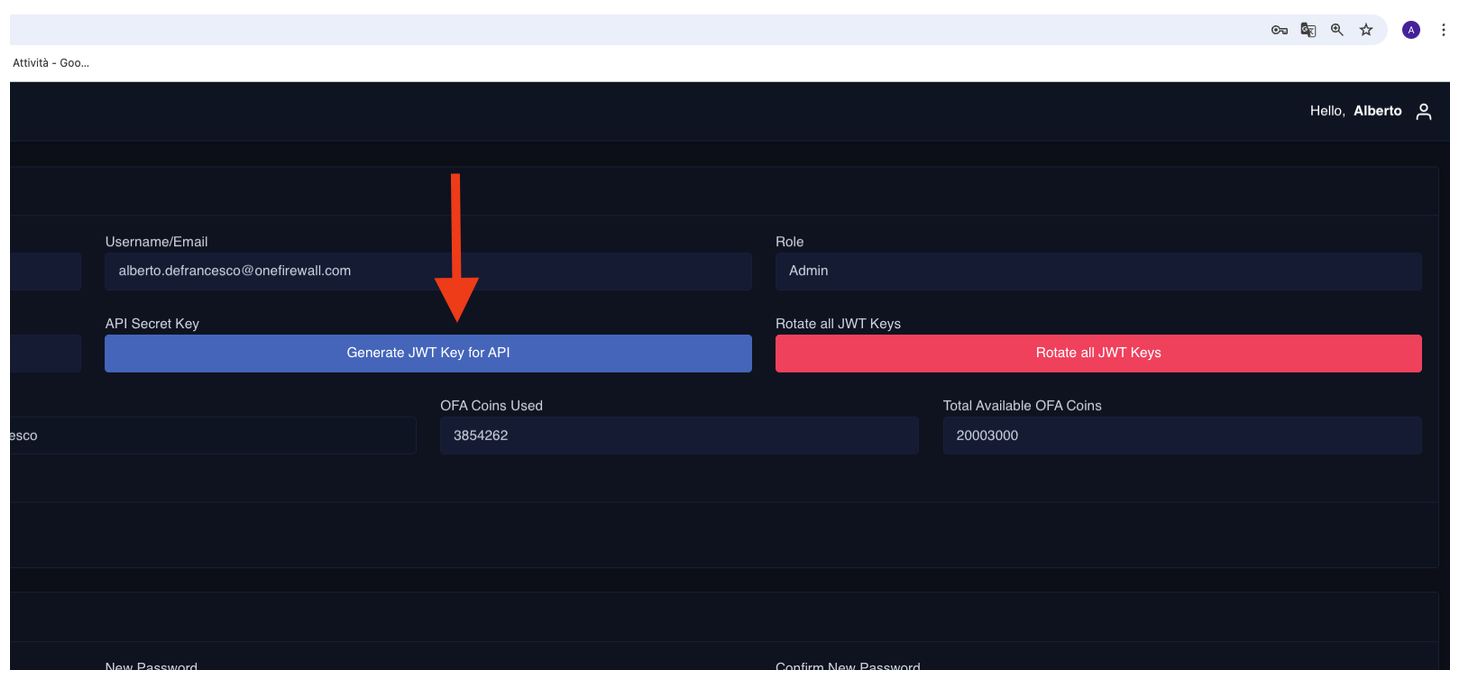
2. Go to the **API Access** section.
3. Click **Generate JWT Token**.
4. Save the token securely — this will be used to authenticate feed requests.
 ***
## Step 2: Configure Indicators in SmartConsole
For each threat type, follow these general steps:
### A. Create an External Dynamic List (EDL)
1. In **SmartConsole**, navigate to:\
`Security Policies` → `Threat Prevention` → `Indicators` → `External Feeds`
2. Click **New > Indicator Feed**.
3. Choose the type (IP, Domain, URL, File Hash).
4. Fill in the fields:
* **Name**: `OFA - [Type] Feed` (e.g., `OFA - IP Feed`)
* **Feed URL**: URL provided by OneFirewall
* **Authentication**:
* Select `Custom Headers`
* Add Header:
* `Authorization` → ``
* (`N.B.` if the Header is not working, you can also put the OFA jwt token through the `Basic Auth`. Fill the `username` with the OFA jwt token, and keep `password` **empty** or with a **whitespace**)
* **Refresh Interval**: e.g., `5 minutes` (as preferred)
* Enable `SSL Verification` if supported and required
5. Click **OK** to save.
### B. Create a Rule Using the Indicator Feed
1. Go to **Security Policies**.
2. Add a new rule (Access or Threat Prevention, depending on traffic type).
3. In the **Source** or **Destination**, choose the relevant Indicator Feed object.
4. Define the desired action (Drop, Reject, Prevent, etc.).
5. Install policy.
***
## Feed Types and URL Format
Each OFA feed corresponds to a specific type of threat indicator:
| Feed Type | URL Example |
| ------------ | ------------------------------------------------------------------------------------------------------------------------------------------------ |
| IP Addresses | `https://api.onefirewall.com/api/v1/ipv4/{OFA_SCORE}?agid=OFA-AGENT-ID-{RANDOM_ALFA_NUMERIC}&plugin=checkpoint-ip` |
| Domains | `https://api.onefirewall.com/api/v1/domains/score/{OFA_SCORE}?agid=OFA-AGENT-ID-{RANDOM_ALFA_NUMERIC}&plugin=checkpoint-domain` |
| URLs | `https://api.onefirewall.com/api/v1/urls/score/{OFA_SCORE}?agid=OFA-AGENT-ID-{RANDOM_ALFA_NUMERIC}&plugin=checkpoint-url` |
| File Hashes | `https://api.onefirewall.com/api/v1/files/score/{OFA_SCORE}?digest=MD5&agid=OFA-AGENT-ID-{RANDOM_ALFA_NUMERIC}&plugin=checkpoint-hash-md5` |
| File Hashes | `https://api.onefirewall.com/api/v1/files/score/{OFA_SCORE}?digest=SHA1&agid=OFA-AGENT-ID-{RANDOM_ALFA_NUMERIC}&plugin=checkpoint-hash-sha1` |
| File Hashes | `https://api.onefirewall.com/api/v1/files/score/{OFA_SCORE}?digest=SHA256&agid=OFA-AGENT-ID-{RANDOM_ALFA_NUMERIC}&plugin=checkpoint-hash-sha256` |
> Replace these with actual URLs provided in your OFA dashboard. Authentication via bearer token is required. OFA\_SCORE is the score suggested by OneFirewall guidance, and RANDOM\_ALFA\_NUMERIC is a random alfa numeric value, i.e. 827c65d86a44.
***
## Notes
* OneFirewall uses **JWT-based Bearer Authentication**.
* Ensure your Check Point version supports **custom HTTP headers** in EDLs.
* Feeds are **auto-refreshable** and optimized for Check Point integration.
* All feed types can be used **simultaneously** in different rules or combined policies.
***
## Step 2: Configure Indicators in SmartConsole
For each threat type, follow these general steps:
### A. Create an External Dynamic List (EDL)
1. In **SmartConsole**, navigate to:\
`Security Policies` → `Threat Prevention` → `Indicators` → `External Feeds`
2. Click **New > Indicator Feed**.
3. Choose the type (IP, Domain, URL, File Hash).
4. Fill in the fields:
* **Name**: `OFA - [Type] Feed` (e.g., `OFA - IP Feed`)
* **Feed URL**: URL provided by OneFirewall
* **Authentication**:
* Select `Custom Headers`
* Add Header:
* `Authorization` → ``
* (`N.B.` if the Header is not working, you can also put the OFA jwt token through the `Basic Auth`. Fill the `username` with the OFA jwt token, and keep `password` **empty** or with a **whitespace**)
* **Refresh Interval**: e.g., `5 minutes` (as preferred)
* Enable `SSL Verification` if supported and required
5. Click **OK** to save.
### B. Create a Rule Using the Indicator Feed
1. Go to **Security Policies**.
2. Add a new rule (Access or Threat Prevention, depending on traffic type).
3. In the **Source** or **Destination**, choose the relevant Indicator Feed object.
4. Define the desired action (Drop, Reject, Prevent, etc.).
5. Install policy.
***
## Feed Types and URL Format
Each OFA feed corresponds to a specific type of threat indicator:
| Feed Type | URL Example |
| ------------ | ------------------------------------------------------------------------------------------------------------------------------------------------ |
| IP Addresses | `https://api.onefirewall.com/api/v1/ipv4/{OFA_SCORE}?agid=OFA-AGENT-ID-{RANDOM_ALFA_NUMERIC}&plugin=checkpoint-ip` |
| Domains | `https://api.onefirewall.com/api/v1/domains/score/{OFA_SCORE}?agid=OFA-AGENT-ID-{RANDOM_ALFA_NUMERIC}&plugin=checkpoint-domain` |
| URLs | `https://api.onefirewall.com/api/v1/urls/score/{OFA_SCORE}?agid=OFA-AGENT-ID-{RANDOM_ALFA_NUMERIC}&plugin=checkpoint-url` |
| File Hashes | `https://api.onefirewall.com/api/v1/files/score/{OFA_SCORE}?digest=MD5&agid=OFA-AGENT-ID-{RANDOM_ALFA_NUMERIC}&plugin=checkpoint-hash-md5` |
| File Hashes | `https://api.onefirewall.com/api/v1/files/score/{OFA_SCORE}?digest=SHA1&agid=OFA-AGENT-ID-{RANDOM_ALFA_NUMERIC}&plugin=checkpoint-hash-sha1` |
| File Hashes | `https://api.onefirewall.com/api/v1/files/score/{OFA_SCORE}?digest=SHA256&agid=OFA-AGENT-ID-{RANDOM_ALFA_NUMERIC}&plugin=checkpoint-hash-sha256` |
> Replace these with actual URLs provided in your OFA dashboard. Authentication via bearer token is required. OFA\_SCORE is the score suggested by OneFirewall guidance, and RANDOM\_ALFA\_NUMERIC is a random alfa numeric value, i.e. 827c65d86a44.
***
## Notes
* OneFirewall uses **JWT-based Bearer Authentication**.
* Ensure your Check Point version supports **custom HTTP headers** in EDLs.
* Feeds are **auto-refreshable** and optimized for Check Point integration.
* All feed types can be used **simultaneously** in different rules or combined policies.